

Samsung Screen Flickering Issue: Common Causes and Risks
Screen flickering on Samsung devices may appear as brief flashes, brightness instability, or irregular refresh behavior that affects daily usability.
Samsung screen flickering issue often develops gradually and may not cause immediate failure, but it can indicate early instability within the display system that should not be ignored.
For a complete overview of professional solutions, you can refer to:
👉 phone repair Hanoi: https://smartphoneaccessories.com.vn/phone-repair-hanoi/
For Samsung-specific device inspection and diagnostics, you can refer to:
👉 Samsung phone repair Hanoi: https://smartphoneaccessories.com.vn/phone-repair-hanoi/samsung-phone-repair-hanoi/
What Is Samsung Screen Flickering Issue
Screen flickering refers to inconsistent brightness, flashing lines, or momentary blackouts that occur during normal phone operation.
In many cases, flickering begins intermittently and gradually becomes more frequent, especially during screen transitions or brightness adjustments.
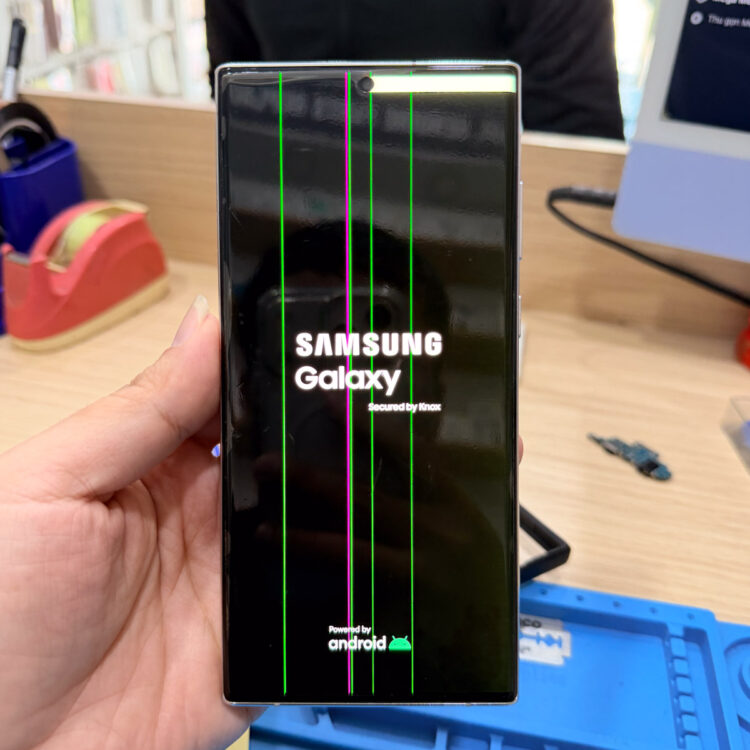
This behavior may reflect early panel degradation or connector stress within the display assembly, rather than a temporary software anomaly.
Common Causes of Screen Flickering
Samsung screen flickering issue is commonly associated with the following technical factors:
- Display panel aging affecting refresh consistency
- Loose or stressed display connector
- Internal micro-cracks within the OLED or LCD layers
- Power delivery instability to the screen module
Power instability may also relate to battery performance issues. You can check:
👉 battery issues repair Hanoi: https://smartphoneaccessories.com.vn/battery-issues-repair-hanoi/
Why Screen Flickering Should Not Be Ignored
Although flickering may seem minor at first, it can indicate underlying structural stress within the display system.
Continued use without inspection may lead to:
- Permanent display failure
- Loss of touch accuracy
- Increased power consumption
- Reduced long-term device stability
Early assessment helps prevent further degradation.
Inspection Approach and Risk Awareness
Professional inspection focuses on identifying whether the issue originates from the panel itself, internal connectors, or supporting circuitry.
Clear diagnosis allows users to understand the root cause before deciding on any corrective action, reducing the risk of unnecessary part replacement.
Recommended Solution
For persistent display instability or flickering issues, you can refer to:
👉 screen issues repair Hanoi : https://smartphoneaccessories.com.vn/screen-issues-repair-hanoi/
